

How to Choose the Best Leave Management Software for Your Business Size and Industry
- Posted by Margaret Kahng
- On April 30, 2026
- 0 Comments
Leave management software is the backbone of modern HR operations, helping businesses avoid payroll errors, compliance risks, and lost productivity caused by manual errors.
Many companies still rely on spreadsheets, which makes managing employee absences slow and inaccurate.
This guide breaks down how to choose the right solution based on your business size, industry, and operational needs — including platforms built for large employers so you can improve organizational efficiency and reduce administrative tasks.
You’ll learn how leave management software solutions work, which key features matter most, and how to compare options using a practical HR software comparison approach.
What Is Leave Management Software and Why It Matters
Definition and Core Functions
Leave management software is a system designed to automate the entire process of managing employee leave.
It helps hr teams track employee time, manage leave requests, and maintain accurate records across the entire employee lifecycle.
Core functions include:
- Automating leave requests and approving leave requests through workflows.
- Tracking leave balances and employees’ eligibility.
- Integrating with payroll systems for payroll processing and payroll calculations.
- Providing real-time visibility into employee absences and schedules.
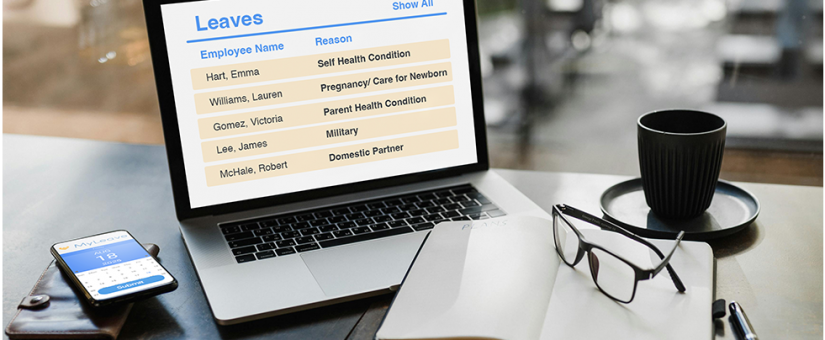
Most systems include a self-service portal that allows employees to submit leave requests, check leave balances, and request time off in just a few clicks.
Key Business Benefits
The impact of leave management goes beyond tracking time off.
It supports workforce management, compliance, and employee experience.
Key benefits include:
- Reducing administrative tasks for hr teams.
- Ensuring compliance with labor regulations and federal regulations.
- Improving employee engagement through employee self-service tools.
- Delivering valuable insights through absence tracking and reporting.
Automation helps reduce costs and enhances efficiency by removing manual processes.
Types of Leave Management Systems Based on Business Size
Small Businesses (1–50 Employees)
Small teams need simple management software that is easy to implement.
They focus on managing employee time without complex workflows.
Key requirements include:
- Basic PTO and sick leave tracking.
- Mobile accessibility for employees.
- Simple attendance tracking and time tracking.
- Easy setup with minimal hr processes.
A cloud-based leave management system helps small teams manage paid time without adding complexity.
Mid-Sized Businesses (50–500 Employees)
As teams grow, managing employee absences becomes more complex.
Mid-sized businesses need scalable leave management solutions.
Important features include:
- Automated request management and approval workflows.
- Integration with payroll systems and HRIS platforms.
- Reporting tools to generate reports and track absence trends.
- Calendar integration for scheduling visibility.
These tools support better workforce planning and improve time management across departments.
Enterprises (500+ Employees)
Large organizations need advanced absence management software with strong compliance capabilities.
They often operate across multiple locations and must stay compliant with state and federal rules.
Enterprise needs include:
- Advanced compliance tools for ensuring compliance.
- Real-time insights and centralized dashboards.
- Integration with global payroll processing systems.
- Support for maternity leave, jury duty, and complex policies.
A centralized platform ensures consistency across teams and improves organizational efficiency.
Industry-Specific Leave Management Needs
Healthcare and Shift-Based Industries
Healthcare relies on precise scheduling and real-time visibility.
Employee absences must be managed carefully to avoid staffing gaps.
Key needs include:
- Shift-based scheduling and attendance management.
- Real-time visibility into employee time.
- Compliance with labor regulations.
Retail and Hospitality
Retail businesses experience high turnover and seasonal hiring.
Managing employee leave requires flexibility.
Key requirements:
- Mobile accessibility for employees.
- Quick approval workflows.
- Tools for managing employee time during peak seasons.
Corporate and Tech Companies
Corporate environments often focus on flexible policies and remote teams.
Important features:
- Integration with tools like Microsoft Teams and Google Workspace.
- Flexible leave management policies.
- Real-time insights into employee availability.
Manufacturing and Field Services
These industries rely heavily on time tracking and attendance tracking.
Core needs include:
- Integration with time tracking systems.
- Accurate payroll calculations.
- Compliance with state and federal regulations.
Key Features to Look for in Leave Management Software
Automation and Workflow Management
Automation simplifies the entire process of leave management.
It reduces manual errors and speeds up approvals.
Look for:
- Automated workflows for leave requests.
- Notifications for approving leave requests.
- Custom policy settings.
Integration Capabilities
Seamless integration is essential for modern hr functions.
Important integrations include:
- Payroll systems for payroll processing.
- HRIS for human resources management.
- Calendar integration for scheduling.
Reporting and Analytics
Data plays a major role in workforce management.
Useful reporting features include:
- Comprehensive reporting on leave data.
- Tracking absence trends.
- Generating valuable insights.
Compliance and Policy Management
Compliance is critical in leave management.
A strong system helps stay compliant with labor regulations.
Look for:
- Automated compliance tracking.
- Policy configuration tools.
- Support for state and federal requirements.
User Experience and Accessibility
A good employee experience depends on usability.
Key elements include:
- Mobile accessibility for remote access.
- Employee self service portal for submitting absence requests.
- Simple interfaces for quick adoption.
Security and Data Protection
Employee data must remain secure at all times.
Key protections include:
- Role-based access.
- Data encryption.
- Secure storage.
How to Compare HR Software Options Effectively
Choosing the right leave management software requires a structured comparison.
Follow these steps:
- Identify your business needs and hr tasks.
- Create a checklist of key features.
- Compare scalability and flexibility.
- Evaluate pricing versus ROI.
- Test usability with demos.
Quick Comparison Table
| Factor | What to Evaluate | Why It Matters |
|---|---|---|
| Features | Automation, reporting | Improves efficiency |
| Integration | Payroll systems, HR tools | Ensures seamless integration |
| Scalability | Growth support | Avoids switching later |
| Usability | Self service portal | Improves adoption |
| Cost | ROI vs price | Helps reduce costs |
Common Mistakes to Avoid When Choosing Leave Management Software
Many companies make avoidable mistakes during selection.
Avoid these pitfalls:
- Ignoring scalability and future growth.
- Overlooking integration with payroll systems.
- Choosing based only on price.
- Not testing the system before implementation.
- Ignoring employee experience.
A poor choice can increase administrative tasks instead of reducing them.
Implementation Best Practices for Maximum ROI
A successful rollout ensures long-term value.
Follow these steps:
- Conduct a needs assessment across hr teams.
- Train employees on how to submit leave requests.
- Customize workflows based on company policies.
- Monitor performance using real-time insights.
- Continuously optimize processes.
A well-planned rollout improves workforce management and enhances efficiency.
Future Trends in Leave Management and Workforce Tools
Technology continues to reshape human resources management.
New trends are improving how companies handle leave management.
Key trends include:
- AI-driven absence management and predictive planning.
- Better integration with workforce management tools.
- Improved mobile accessibility and self-service features.
- Enhanced analytics for managing employee time.
For additional insights on HR trends and compliance, refer to the Society for Human Resource Management.
FAQ Section
What is the best leave management software for small businesses?
The best solution is simple, affordable, and easy to use.
It should support basic leave management and attendance tracking.
How does leave management software improve productivity?
It reduces manual work, improves time management, and ensures accurate records.
Can leave management systems integrate with payroll software?
Yes, most systems offer seamless integration with payroll systems for accurate payroll processing.
What features should I prioritize in HR software comparison?
Focus on automation, reporting, compliance, and user experience.
Is cloud-based leave management software secure?
Yes, modern systems use encryption and access controls to protect employee data.
Conclusion
Choosing the right leave management software depends on your business size, industry, and operational complexity.
A small business may need simplicity, while large organizations require advanced absence management software and compliance tools.
Focus on scalability, seamless integration, and usability to support the entire employee lifecycle.
A well-chosen system improves employee engagement, reduces costs, and strengthens workforce management.
Take time to evaluate your business needs and select a solution that supports long-term growth and efficient leave management.
Gravatar
0 Comments