


A Complete Buyer’s Guide to Choosing Absence Management Software
- Posted by Margaret Kahng
- On May 28, 2026
- 0 Comments
Absence management software can turn messy leave tracking into a clear, repeatable process that helps HR teams save time, reduce errors, and stay compliant.
Employee absences affect payroll, staffing, team morale, and daily operations.
When leave requests sit in emails, spreadsheets, or chat messages, managers lose visibility and employees lose trust in the process. The right leave management solutions replace that scramble with one clear, auditable workflow.
A strong system helps track sick leave, annual leave, jury duty, maternity leave, FMLA tracking, and paid time off in one place.
For businesses comparing absence management software, the goal is simple: choose a management software solution that makes absence requests easier, improves employee self-service, and gives HR managers a clear view of the entire process.
What Is Absence Management Software?
Absence management software is a system that helps companies manage employee absences, leave requests, approvals, balances, policies, and reports.
It replaces scattered tracking methods with a single system where employees can submit leave requests, managers can approve or deny them, and HR teams can review employee data.
This type of leave management platform often supports:
- PTO requests
- Sick leave
- Annual leave
- Jury duty
- Maternity leave
- FMLA tracking
- Paid time off
- Employee leaves
- Time off requests
- Attendance tracking
- Leave balance updates
- Manager reminders
- HR analytics
The main purpose is to make leave management easier and more accurate.
Employees can request time off through a self-service portal.
Appropriate managers can review absence requests in just a few clicks.
HR teams can track employee time, leave balance, absence patterns, and company policies without chasing updates.
Why Absence Tracking Matters
Absence tracking is more than counting who is out of the office.
It helps a business understand how employee absences affect staffing, payroll, work hours, and business goals.
Without a clear management system, small businesses and large organizations can run into the same problems.
Common issues include:
- Lost leave requests
- Wrong PTO balances
- Slow approvals
- Payroll mistakes
- Uneven policy enforcement
- Poor employee experience
- Missed compliance steps
- Limited insight into absence trends
Tracking employee attendance is also crucial for maintaining productivity and ensuring compliance with labor laws.
The U.S. Department of Labor explains employee rights under the Family and Medical Leave Act, which is one major law employers may need to account for during leave management.
A good attendance management process helps HR managers identify absence trends early.
For example, if one department has frequent Monday sick leave, HR can review attendance trends before they become a larger workforce management issue.
Key Features to Look For
The right leave management software should fit your business needs, not force your company into a rigid process.
Before choosing a tool, review the key features that matter most.
Employee Self Service
Employee self-service is one of the biggest time savers in any leave management system.
Employees should be able to request time, check their leave balance, upload documents, and review request status without emailing HR.
A useful self-service portal should allow employees to:
- Submit leave requests
- View available paid time
- Check pending absence requests
- See approved time off
- Review company policies
- Update employee information when needed
This helps empower employees while reducing the number of routine questions HR teams receive.
It also gives employees greater visibility into their own time management.
Automated Request Management
Manual request management slows down the entire process.
A strong management software platform should route leave requests to appropriate managers based on location, department, role, or policy.
Automated workflows can support:
- Approving leave requests
- Denying requests with notes
- Sending PTO alerts
- Notifying managers
- Updating calendars
- Logging approval history
- Flagging missing details
This can be a game-changer for businesses that still rely on email chains.
It helps managers respond faster and keeps HR from manually tracking every request.
Custom Leave Policies
Every company handles time off differently.
Some businesses offer fixed annual leave.
Others use accrual rules based on employee time, work hours, years of service, or employee type.
A flexible leave management platform should support:
- PTO accruals
- Carryover limits
- Sick leave rules
- Holiday calendars
- Blackout dates
- Waiting periods
- Part-time employee rules
- State-specific leave policies
- Medical Leave Act Requirements
The system should allow HR managers to apply company policies consistently.
This helps ensure compliance and reduces confusion for both employees and managers.
Attendance Tracking and Time Tracking
Attendance tracking and time tracking often connect closely with absence management.
If an employee is out, payroll and scheduling teams need accurate information.
The software should help HR easily track:
- Employee absences
- Employee leaves
- Work hours
- Paid time
- Time off
- Attendance patterns
- Leave balances
- Approved absence requests
This helps reduce payroll errors.
It also gives managers an instant overview of who is available, who is out, and which teams may need coverage.
HR Analytics and Reporting
HR analytics can help companies turn absence data into useful business insight.
Reports can show absence patterns, sick leave trends, department-level attendance issues, and high-use leave categories.
Good reporting can help HR teams:
- Identify absence trends
- Review attendance management data
- Plan staffing needs
- Improve resource planning
- Track leave costs
- Spot policy gaps
- Recognize strong attendance records
- Support workforce management decisions
Worth noting, reports should be easy to filter.
HR teams may need to sort by date, department, manager, location, job type, leave type, or employee group.
How Absence Management Helps HR Teams
A cloud-based solution can help HR teams move from manual work to a cleaner digital process.
Instead of managing absence requests in several places, HR can use one management system to track the full leave lifecycle.
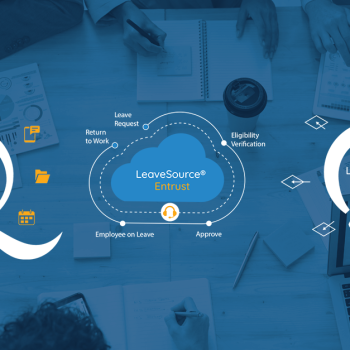
That lifecycle often includes:
- Employee submits a request.
- The system checks the leave balance.
- The request goes to the right manager.
- The manager reviews staffing impact.
- The system records approval or denial.
- Payroll receives updated leave data.
- HR reviews trends and compliance records.
This process helps save time because HR does not need to repeat the same checks by hand.
It also improves accuracy because employee data is updated in one place.
For large organizations, this creates greater visibility across locations.
For small businesses, it reduces the risk of relying on one person to remember every absence detail.
Integration With HR and Business Systems
A leave management system should not operate alone.
It should connect with the systems your business already uses for payroll, HR processes, time management, and employee records.
Useful integrations may include:
- Payroll systems
- HR information systems
- Time tracking tools
- Workforce management tools
- Attendance management tools
- Single sign-on systems
- Google Workspace calendars
- Reporting platforms
- Mobile apps
The goal is to reduce duplicate work.
If HR enters a leave request in one system and payroll enters it again elsewhere, mistakes can happen.
A better setup allows leave data to move cleanly between systems.
This improves payroll accuracy and helps managers trust the information they see.
Compliance and Leave Documentation
Compliance is one of the most important reasons to invest in better absence management.
U.S. employers may need to manage federal, state, and local leave rules.
They may also need to keep accurate documentation for protected leave, sick leave, maternity leave, and other employee leaves.
A strong system should help HR teams:
- Track eligibility
- Store documents
- Record approvals
- Monitor return dates
- Send reminders
- Keep audit trails
- Apply leave policies fairly
- Generate reports when needed
The system does not replace legal guidance.
But it can help ensure compliance by keeping the right records in the right place.
This is especially important for FMLA tracking and other leave types that require careful documentation.
Comparing SaaS HR Solutions
Many modern HR tools are SaaS HR solutions.
This means they are cloud-based, accessed online, and often updated by the provider.
That can be helpful because HR teams do not need to manage local servers or software installs.
Still, each platform should be compared carefully.
Use these questions during your HR software comparison:
| Buying Area | What to Ask | Why It Matters |
|---|---|---|
| Ease of use | Can employees submit requests in just a few clicks? | Improves adoption |
| Policy setup | Can the system match our company policies? | Reduces manual work |
| Reporting | Can HR review absence trends and attendance data? | Supports better planning |
| Payroll | Does leave data connect to payroll? | Improves pay accuracy |
| Compliance | Does it support FMLA tracking and documentation? | Helps stay compliant |
| Mobile access | Are mobile apps available? | Helps employees and managers act faster |
| Security | Can access be limited by role? | Protects employee information |
| Scalability | Can it support multiple locations? | Helps the system grow with the business |
Do not rely only on a general demo.
Ask to see how the system handles your real leave policies, employee groups, and approval rules.
Common Mistakes to Avoid
Choosing management software can feel simple at first.
But many teams focus on surface-level features and miss the details that affect daily use.
Choosing Based Only on Price
Low-cost tools can help some small businesses.
But price alone should not drive the decision.
A cheaper platform may create extra work if it lacks reporting, integrations, or policy controls.
Ignoring the Manager Experience
Managers are often responsible for approving leave requests.
If the manager’s view is confusing, requests may sit too long.
That can frustrate employees and create staffing gaps.
Forgetting About Payroll
Leave management affects pay.
If the system does not connect with payroll, HR may still need to export data, check balances, and fix errors by hand.
Skipping Compliance Review
Some companies only think about vacation tracking.
But leave management may involve sick leave, the Medical Leave Act rules, state laws, and internal policy requirements.
Compliance features should be reviewed before signing any agreement.
Overlooking Employee Experience
Employees want a simple way to request time off and check their leave balance.
A confusing system can reduce trust and increase HR questions.
Employee experience should be part of the buying decision.
Buyer’s Checklist
Before choosing a leave management platform, use this checklist to compare your options.
- Employees can submit leave requests through a self-service portal.
- Managers can approve or deny requests in just a few clicks.
- HR teams can easily track employee absences and leave balance.
- The system supports sick leave, annual leave, jury duty, maternity leave, and paid time off.
- The platform supports FMLA tracking and compliance documentation.
- Reports show absence patterns, attendance trends, and absence trends.
- Payroll and HR systems can connect with the platform.
- Mobile apps are available for managers and employees.
- Employee data is protected with role-based access.
- The system can grow with your business needs.
- HR managers can adjust leave policies as rules change.
- Employees receive clear request status updates.
This checklist can help your team practically compare platforms.
It also keeps the buying process focused on real work, not just feature lists.
What a Strong System Should Deliver
A strong absence management process should create clarity for everyone.
Employees should know how to request time.
Managers should know who is out.
HR should know whether policies are being followed.
Payroll should receive clean data.
Leadership should see how absences affect workforce planning.
The right system should help a business:
- Manage employee absences in one place
- Reduce manual HR processes
- Improve time off visibility
- Support attendance tracking
- Spot absence patterns
- Improve leave request management
- Protect employee information
- Ensure compliance
- Save time for HR teams
- Improve employee experience
This is where technology becomes useful.
It removes friction from a common workplace process and helps people make better decisions with better data.
Final Thoughts
Choosing the right leave management software starts with understanding your current process.
Look at how employees request time, how managers approve requests, how payroll receives updates, and how HR tracks compliance.
Then compare each management software solution against those needs.
The best choice should give your team a single system for leave tracking, employee self-service, reporting, compliance, and workforce management without adding extra confusion.
0 Comments